# Checkout
> This guide uses the **[GlomoPay Unified SDK](/platform/sdk/unified-sdk)** — see it for the full set of journeys and options. To open checkout inside a native mobile app, see **[Web Checkout in a Mobile App (WebView)](/platform/sdk/web-checkout-in-mobile-app)**. If you integrated earlier with the older `checkout-sdk`, it continues to work — switch the import to the Unified SDK when convenient.
**Migrating from the legacy `checkout-sdk`?** Two behaviour differences to note:
- When `callbackUrl` is set, the Unified SDK **only redirects** — it no longer also fires your `.on('payment.success')` / `.on('payment.failure')` / `.on('payment.bank_transfer_submitted')` handlers (the legacy SDK did both). `checkout.closed` is unaffected.
- `on()` now returns an unsubscribe function (call it to remove the listener); the legacy SDK returned nothing.
Glomo Checkout offers a prebuilt payment form that enables businesses to securely accept payments online. With its
built-in features, you can minimize development time and streamline the payment process. Embed Checkout directly into
your website, or direct customers to a Glomo-hosted payment page to start accepting payments.
Checkout requires minimal coding because of its prebuilt functionalities and customization options. You can integrate
Checkout by creating a Checkout Session and collecting the customer’s payment details.
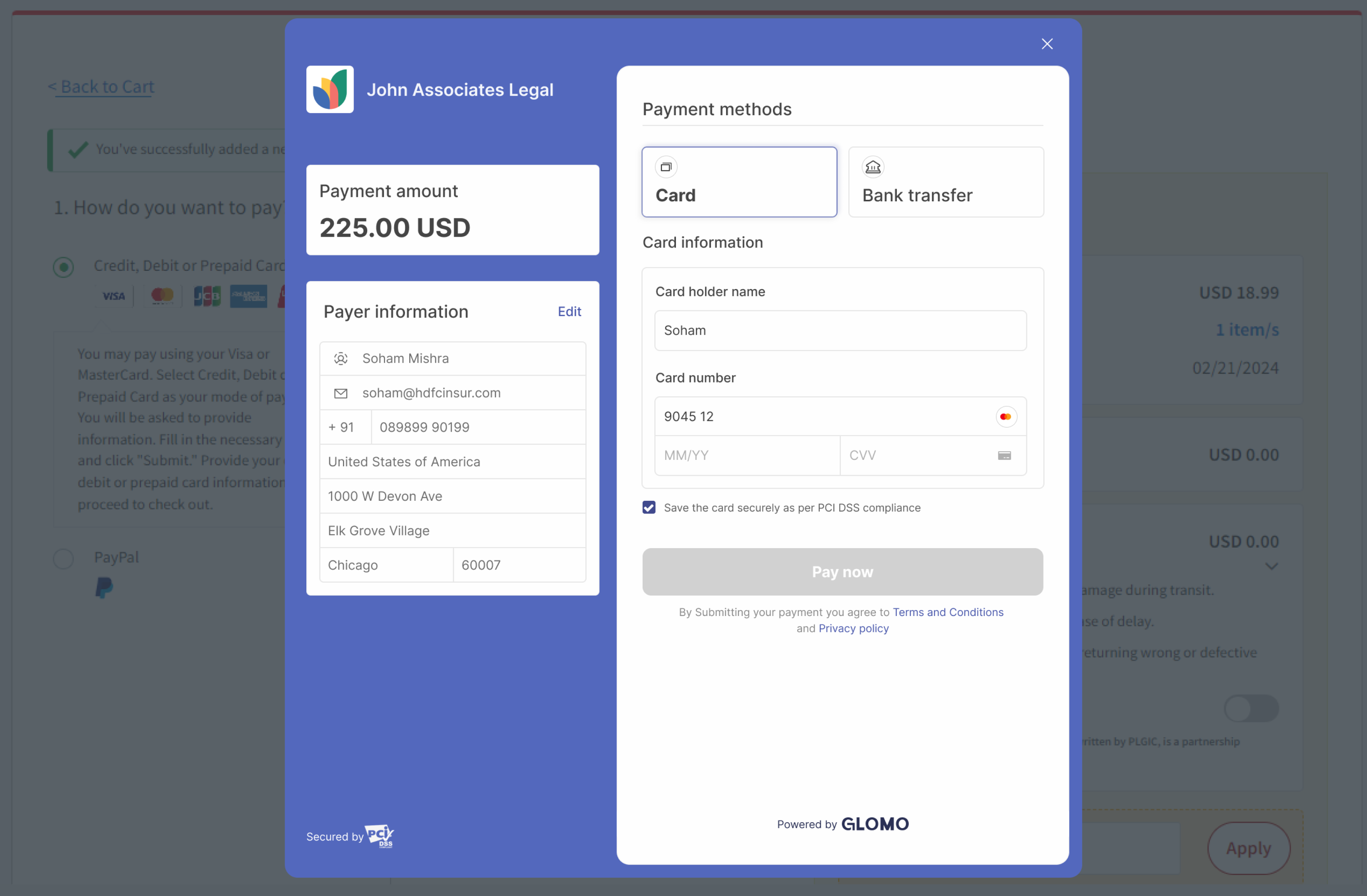
## End-to-End Flow in Accepting Payments
Below are the steps that are to accept payments :-
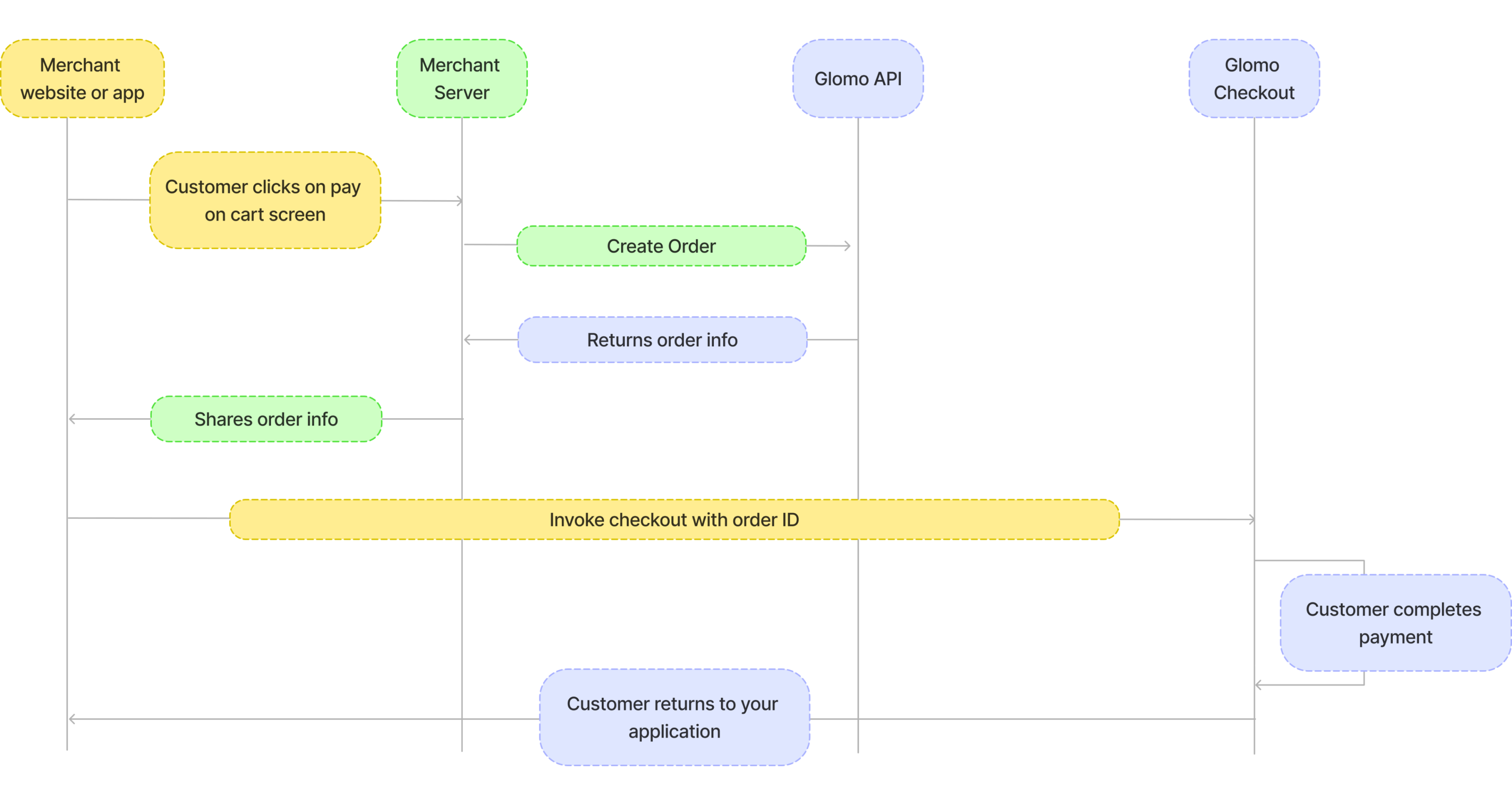
## Visual Representation of Payment Flow
A visual representation for the sequence of steps is given below :-
## Steps to integrate Checkout
**Note:** We recommend using ES module imports for the Glomo Checkout SDK. While UMD format is still supported for legacy compatibility, it is not actively maintained. For optimal performance and future support, please use ES modules. If you absolutely require UMD format, please contact our support team for assistance.
details
summary
1.
b
Create an Order in Server
- You will have to create an order from your server using the secret keys.
- You can get the secret key on your glomopay [dashboard](https://app.glomopay.com/api-keys-and-webhooks/api-keys).
- You can create order by integrating our [Order APIs](/api-reference/openapi/orders/createorder).It
should be a server side api call. Refer [Authentication](/platform/authentication) for details around
how to authenticate Order's API.
- The `order_id` received in the response should be passed to the checkout. This ties the order with the payment and
secures the request from being tampered.
details
summary
2.
b
Add payment button on client
* Add a buy button on your website.
* You can integrate the checkout by adding the below code snippet to your website.
* The code snippet will create a checkout instance and open the checkout form when the user clicks on the buy button.
* The `orderId` of the order created via your server in step 1 should be passed to the checkout instance.
* The `publicKey` refers to the public key of your glomo account present on your [dashboard](https://app.glomopay.com/api-keys-and-webhooks/api-keys).
* Handle the payment success and failure events, in the handlers function you will get payment object or error object based on the payment status. Collect these and send them to your server and retry accordingly in case payment failed.
* For bank transfer payments, a `payment.bank_transfer_submitted` event is emitted when the user submits their payment details on the checkout. **This event only indicates that the user has submitted payment details; it does not confirm that the payment has been completed or verified** — please wait for webhooks to determine the final payment status.
* Additionally, you can also provide a `callbackUrl` to redirect the user after payment completion. If you provide a `callbackUrl`, the user will be redirected to that URL after payment completion with the payment status and other details in the query parameters.
* If `callbackUrl` is provided,failure and success events will not be triggered in the checkout instance.
HTML
```html
```
```js
// glomo-checkout.js
import { GlomoCheckoutApi } from 'https://unified-sdk.glomopay.com/index.js';
const checkout = new GlomoCheckoutApi({
orderId: 'order_679a16457aP6K', // Pass the order_id received from the server in step 1
publicKey: 'live_687b0151Bid24PAI', // Pass the public key received from the dashboard
callbackUrl: 'https://yourwebsite.com/payment-result', // Optional: URL to redirect after payment completion
});
document.getElementById('buy-button').addEventListener('click', () => {
checkout.open();
});
checkout.on('payment.success', function (response) {
// Handle payment success
});
checkout.on('payment.failure', function (response) {
// Handle payment failure
});
// Bank transfer only: emitted when the user submits their payment details.
// Does NOT mean the payment is successful — await a webhook for confirmation.
checkout.on('payment.bank_transfer_submitted', function (response) {
// response.orderId - the order ID
});
// Handler for when the user closes the checkout popup without completing payment.
// The checkout opens in a new popup window. When the user closes it, focus
// returns to the parent page — use that signal combined with payment state tracking
// to detect an abandoned checkout.
let paymentCompleted = false;
checkout.on('payment.success', function (response) {
paymentCompleted = true;
// Handle payment success
});
checkout.on('payment.failure', function (response) {
paymentCompleted = true;
// Handle payment failure
});
function onWindowFocus() {
if (!paymentCompleted) {
// User closed the checkout popup without completing payment.
// Use this to restore your UI, log abandonment, or prompt the user to retry.
console.log('Checkout closed without payment');
window.removeEventListener('focus', onWindowFocus);
}
}
document.getElementById('buy-button').addEventListener('click', () => {
paymentCompleted = false; // Reset on each new checkout attempt
checkout.open();
window.addEventListener('focus', onWindowFocus);
});
```
React (TS)
```jsx
import { FC, useState } from "react";
interface PurchaseButtonProps {
orderId: string;
publicKey: string;
}
const PurchaseButton: FC = ({ orderId, publicKey }) => {
const buttonRef = useRef(null);
const loadCheckout = async () => {
try {
const { GlomoCheckoutApi } = await import('https://unified-sdk.glomopay.com/index.js');
// With callback URL option - user will be redirected after payment
const checkout = new GlomoCheckoutApi({
orderId,
publicKey,
callbackUrl: 'https://yourwebsite.com/payment-result', // Optional
});
// Set up the click handler on the button
if (buttonRef.current) {
buttonRef.current.addEventListener('click', checkout.open.bind(checkout));
}
// Listen for payment success
checkout.on('payment.success', function () {
// Handle payment success (e.g., update state or notify the user)
});
// Listen for payment failure
checkout.on('payment.failure', function (response: unknown) {
console.error('Payment failed:', response);
// Handle payment failure (e.g., show an error message)
});
// Bank transfer only: emitted when the user submits their payment details.
// Does NOT mean the payment is successful — await a webhook for confirmation.
checkout.on('payment.bank_transfer_submitted', function (response: unknown) {
// Handle bank transfer submission (e.g., show a pending state to the user)
});
} catch (error) {
console.error('Error loading the checkout SDK:', error);
}
};
useEffect(() => {
loadCheckout();
}, []);
return (
)
}
```
### About the Callback URL
When you provide a `callbackUrl`, the user will be automatically redirected to that URL after payment completion with the following parameters:
**For successful payments:**
```
https://yourwebsite.com/payment-result?status=success&orderId=123456&signature=abc123def456
```
**For failed payments:**
```
https://yourwebsite.com/payment-result?status=failed&orderId=123456&signature=abc123def456
```
This allows server-side handling of payment results in addition to the client-side event handlers.
details
summary
3.
b
Verify checkout response and signature in server
* In the payment success handler, you will receive the payment object which will have the payment status along with payment_id and order_id.
* Along with payment_id, order_id and status, we also return a signature. This signature is used to verify the authenticity of the payment object.
* You have to verify the signature by using the secret key provided by Glomo. Send the response to your server, where you can verify the signature using the secret key provided by Glomo.
* For verification, use the payment_id and status from the success response and the order_id which was generated in step 1 instead of the one returned from checkout.
* Generate signature using secret key and verify the generated signature with the signature received in the response.
#### Cards
For card payments, `payment.success` and `payment.failure` events are triggered synchronously once the payment is processed.
**Success Response**
```json
{
"payment_id": "payt_679a16457aP6K",
"order_id": "order_679a16457aP6K",
"status": "success",
"signature": "701eab675aca32c14cd1e5e041842d11ee9d04e91a3aaa73c629664a336b2952"
}
```
**Failure Response**
```json
{
"payment_id": "payt_679a16457aP6K",
"order_id": "order_679a16457aP6K",
"status": "failed",
"error": {
"code": "INVALID_CARD",
"message": "Card not eligible for international payments"
}
}
```
#### Bank Transfer
Bank transfer payments follow an asynchronous flow. When the user submits their transfer details in the checkout, a `payment.bank_transfer_submitted` event fires immediately — this only indicates the user submitted details, not that the payment is confirmed. The `payment.success` or `payment.failure` event is triggered once Glomo reconciles the incoming transfer, which may happen after the checkout is closed.
**Bank Transfer Submitted (Intermediate)**
Emitted when the user submits their payment details in the checkout form. Use this to show a "pending" state to the customer.
```json
{
"orderId": "order_679a16457aP6K"
}
```
**Success Response**
Emitted once the incoming transfer is sighted and reconciled by Glomo. Signature verification is identical to cards.
```json
{
"payment_id": "payt_679a16457aP6K",
"order_id": "order_679a16457aP6K",
"status": "success",
"signature": "701eab675aca32c14cd1e5e041842d11ee9d04e91a3aaa73c629664a336b2952"
}
```
**Failure Response**
```json
{
"payment_id": "payt_679a16457aP6K",
"order_id": "order_679a16457aP6K",
"status": "failed",
"error": {
"code": "PAYMENT_NOT_COMPLETED_BY_USER",
"message": "Payment was not completed by the user"
}
}
```
> **Note:** Because bank transfer confirmation is asynchronous, we strongly recommend also handling payment status via [Webhooks](/platform/webhooks) rather than relying solely on the checkout event handlers.
***Sample Code to verify signature***
details
summary
PHP
```php
```
details
summary
Ruby
```ruby
require 'openssl'
def generate_signature(order_id, payment_id, status, secret)
data = "#{order_id}|#{payment_id}|#{status}"
OpenSSL::HMAC.hexdigest("SHA256", secret, data)
end
# Example Usage
order_id = "order_679a16457aP6K"
payment_id = "payt_679a16457aP6K"
status = "success"
secret = "your_secret_key"
puts generate_signature(order_id, payment_id, status, secret)
```
details
summary
Go
```go
package main
import (
"crypto/hmac"
"crypto/sha256"
"encoding/hex"
"fmt"
)
func generateSignature(orderID, paymentID, status, secret string) string {
data := orderID + "|" + paymentID + "|" + status
h := hmac.New(sha256.New, []byte(secret))
h.Write([]byte(data))
return hex.EncodeToString(h.Sum(nil))
}
func main() {
orderID := "order_679a16457aP6K"
paymentID := "payt_679a16457aP6K"
status := "success"
secret := "your_secret_key"
fmt.Println(generateSignature(orderID, paymentID, status, secret))
}
```
details
summary
Javascript(Node.js)
```javascript
const crypto = require('crypto');
function generateSignature(orderId, paymentId, status, secret) {
const data = `${orderId}|${paymentId}|${status}`;
return crypto.createHmac('sha256', secret).update(data).digest('hex');
}
// Example Usage
const orderId = "order_679a16457aP6K";
const paymentId = "payt_679a16457aP6K";
const status = "success";
const secret = "your_secret_key";
console.log(generateSignature(orderId, paymentId, status, secret));
```
details
summary
Python
```python
import hmac
import hashlib
def generate_signature(order_id, payment_id, status, secret):
data = f"{order_id}|{payment_id}|{status}".encode()
return hmac.new(secret.encode(), data, hashlib.sha256).hexdigest()
# Example Usage
order_id = "order_679a16457aP6K"
payment_id = "payt_679a16457aP6K"
status = "success"
secret = "your_secret_key"
print(generate_signature(order_id, payment_id, status, secret))
```
details
summary
4.
b
Verify Payment status
Payment's status can be tracked via following ways
* You can track the payments linked to your order_id via dashboard
* You can also track the payment status via polling [Payment APIs](/api-reference/openapi/payment/getpaymentbyid)
* You can also track the payment status via [Webhooks](/platform/webhooks) which will notify you about the payment status.
## Troubleshooting Common Issues
### Checkout Popup Blocked in Production Environment
**Symptom:** The checkout works perfectly in your local development environment, but when deployed to UAT or production, the payment page fails to open in a new tab/popup after clicking the "Pay Now" button.
**Cause:** This issue is typically caused by the `Cross-Origin-Opener-Policy` (COOP) security header on your website. If your website sends `Cross-Origin-Opener-Policy: same-origin`, it will block popups to external domains, including the Glomo payment gateway.
#### How to Detect This Issue
1. Open your browser's Developer Tools (F12 or Right-click → Inspect)
2. Go to the **Network** tab
3. Reload your page and click on the main document (usually the first entry)
4. Look at the **Response Headers** section
5. Check if you see: `Cross-Origin-Opener-Policy: same-origin`
If you see this header with the `same-origin` value, this is what's blocking the checkout popup.
#### Solution
Update your server's COOP header configuration from:
```
Cross-Origin-Opener-Policy: same-origin
```
to:
```
Cross-Origin-Opener-Policy: same-origin-allow-popups
```
**How to implement this depends on your setup:**
details
summary
Apache (.htaccess)
```apache
Header set Cross-Origin-Opener-Policy "same-origin-allow-popups"
```
details
summary
Nginx
```nginx
add_header Cross-Origin-Opener-Policy "same-origin-allow-popups";
```
details
summary
Node.js/Express
```javascript
app.use((req, res, next) => {
res.setHeader('Cross-Origin-Opener-Policy', 'same-origin-allow-popups');
next();
});
```
details
summary
Next.js (next.config.js)
```javascript
module.exports = {
async headers() {
return [
{
source: '/(.*)',
headers: [
{
key: 'Cross-Origin-Opener-Policy',
value: 'same-origin-allow-popups',
},
],
},
];
},
};
```
#### Verifying the Fix
After deploying the header change:
1. **Clear your browser cache** (or use incognito/private mode)
2. Reload your website
3. Open Developer Tools → Network tab
4. Verify the header now shows: `Cross-Origin-Opener-Policy: same-origin-allow-popups`
5. Test the checkout flow again
**Note:** The `same-origin-allow-popups` value maintains security for your website while allowing the checkout to open properly in a new window.
### CORS Error on Checkout Load (Preferences API Failure)
**Symptom:** After successfully opening the checkout, you see a CORS (Cross-Origin Resource Sharing) error in the browser console when the checkout tries to load. The error typically mentions the preferences API call failing with a message like:
```
Access to fetch at 'https://...' from origin '...' has been blocked by CORS policy
```
**Cause:** This issue is often caused by browser extensions that intercept or modify network requests. Common culprits include ad blockers, privacy extensions, VPN extensions, and other security-focused browser add-ons.
#### How to Detect This Issue
1. Open your browser's Developer Tools (F12)
2. Go to the **Console** tab
3. Load the checkout and look for CORS-related errors
4. The error will typically mention "blocked by CORS policy" or "No 'Access-Control-Allow-Origin' header"
#### Solution
**Step 1: Test in Incognito/Private Mode**
The quickest way to verify if a browser extension is causing the issue:
1. Open an incognito/private browsing window (most extensions are disabled by default)
2. Test the checkout integration again
3. If the checkout works in incognito mode, a browser extension is the culprit
**Step 2: Identify and Disable Interfering Extensions**
If the checkout works in incognito mode:
1. Go to your browser's extensions page:
- **Chrome/Edge:** `chrome://extensions` or `edge://extensions`
- **Firefox:** `about:addons`
- **Safari:** Preferences → Extensions
2. Disable extensions one by one, especially:
- Ad blockers (AdBlock, uBlock Origin, etc.)
- Privacy extensions (Privacy Badger, Ghostery, etc.)
- VPN or proxy extensions
- Security extensions
- Request interceptors or modifiers
3. Test the checkout after disabling each extension
4. Once you identify the problematic extension, keep it disabled for your domain or whitelist your website
#### For Developers: Communicating with Users
If your customers report this issue, provide them with these troubleshooting steps:
1. Try testing in incognito/private browsing mode
2. If it works there, ask them to temporarily disable browser extensions
3. Common extensions that cause issues: ad blockers, VPN extensions, privacy tools
**Note:** This is not an issue with Glomo's checkout or your integration - it's a side effect of browser extensions modifying network behavior. The checkout will work correctly once interfering extensions are identified and configured properly.
### Content Blocked by Content Security Policy (CSP)
**Symptom:** When attempting to load the Glomo Checkout, you see a message stating "This content is blocked. Contact the site owner to fix the issue." The checkout iframe or SDK scripts fail to load.
**Cause:** Your website has Content Security Policy (CSP) headers configured that are blocking the Glomo Checkout SDK from loading its scripts, iframe, and making API calls. CSP is a security feature that restricts which external resources can be loaded on your page.
#### How to Detect This Issue
1. Open your browser's Developer Tools (F12 or Right-click → Inspect)
2. Go to the **Console** tab
3. Look for errors mentioning "Content Security Policy" or "CSP", such as:
```
Refused to load the script 'https://unified-sdk.glomopay.com/...' because it violates the following Content Security Policy directive...
```
```
Refused to frame 'https://unified-sdk.glomopay.com/' because it violates the following Content Security Policy directive...
```
4. You can also check the **Network** tab → click on your page's main document → **Response Headers** → look for `Content-Security-Policy` header
#### Solution
Update your CSP configuration to allow the Glomo Checkout SDK domains. You need to add the following domains to your CSP directives:
| Domain | Purpose |
| --- | --- |
| `https://unified-sdk.glomopay.com` | SDK scripts, iframe, and source maps |
| `https://*.glomopay.com` | Checkout modal and API calls |
Add these domains to the following CSP directives:
- **`script-src`**: Allows loading the SDK JavaScript
- **`frame-src`**: Allows embedding the checkout iframe
- **`connect-src`**: Allows API calls to Glomo services
The examples below do **not** include `'unsafe-inline'` in `script-src`. The SDK is loaded
as an external ES module, so the origin above is sufficient on its own — and keeping
`'unsafe-inline'` in `script-src` is commonly raised as a finding in security reviews,
because it permits any inline script on your page to execute.
This means your own integration code must not sit in an inline `
```
- **Keep it inline and authorise it with a nonce**, if your server already generates one
per request. The same random value goes in the header and on the tag:
```html
```
The nonce must be regenerated on every response. A hash (`'sha256-...'`) also works, but
breaks the moment you edit the snippet, so it is harder to keep correct.
**How to implement this depends on your setup:**
details
summary
Apache (.htaccess)
```apache
Header set Content-Security-Policy "default-src 'self'; script-src 'self' https://unified-sdk.glomopay.com; frame-src 'self' https://unified-sdk.glomopay.com https://*.glomopay.com; connect-src 'self' https://unified-sdk.glomopay.com https://*.glomopay.com; style-src 'self' 'unsafe-inline';"
```
details
summary
Nginx
```nginx
add_header Content-Security-Policy "default-src 'self'; script-src 'self' https://unified-sdk.glomopay.com; frame-src 'self' https://unified-sdk.glomopay.com https://*.glomopay.com; connect-src 'self' https://unified-sdk.glomopay.com https://*.glomopay.com; style-src 'self' 'unsafe-inline';";
```
details
summary
Node.js/Express
```javascript
app.use((req, res, next) => {
res.setHeader(
'Content-Security-Policy',
"default-src 'self'; " +
"script-src 'self' https://unified-sdk.glomopay.com; " +
"frame-src 'self' https://unified-sdk.glomopay.com https://*.glomopay.com; " +
"connect-src 'self' https://unified-sdk.glomopay.com https://*.glomopay.com; " +
"style-src 'self' 'unsafe-inline';",
);
next();
});
```
details
summary
Next.js (next.config.js)
```javascript
module.exports = {
async headers() {
return [
{
source: '/(.*)',
headers: [
{
key: 'Content-Security-Policy',
value:
"default-src 'self'; script-src 'self' https://unified-sdk.glomopay.com; frame-src 'self' https://unified-sdk.glomopay.com https://*.glomopay.com; connect-src 'self' https://unified-sdk.glomopay.com https://*.glomopay.com; style-src 'self' 'unsafe-inline';",
},
],
},
];
},
};
```
details
summary
ASP.NET Core (C#)
Add this middleware in `Program.cs` (or `Startup.cs`):
```csharp
app.Use(async (context, next) =>
{
context.Response.Headers.Append("Content-Security-Policy",
"default-src 'self'; " +
"script-src 'self' https://unified-sdk.glomopay.com; " +
"frame-src 'self' https://unified-sdk.glomopay.com https://*.glomopay.com; " +
"connect-src 'self' https://unified-sdk.glomopay.com https://*.glomopay.com; " +
"style-src 'self' 'unsafe-inline';");
await next();
});
```
For IIS, you can add these headers in `web.config`:
```xml
```
details
summary
Django (Python)
Using `django-csp` middleware:
```python
# settings.py
CSP_DEFAULT_SRC = ("'self'",)
CSP_SCRIPT_SRC = ("'self'", "https://unified-sdk.glomopay.com")
CSP_FRAME_SRC = ("'self'", "https://unified-sdk.glomopay.com", "https://*.glomopay.com")
CSP_CONNECT_SRC = ("'self'", "https://unified-sdk.glomopay.com", "https://*.glomopay.com")
CSP_STYLE_SRC = ("'self'", "'unsafe-inline'")
```
Or using custom middleware:
```python
class CSPMiddleware:
def __init__(self, get_response):
self.get_response = get_response
def __call__(self, request):
response = self.get_response(request)
response['Content-Security-Policy'] = (
"default-src 'self'; "
"script-src 'self' https://unified-sdk.glomopay.com; "
"frame-src 'self' https://unified-sdk.glomopay.com https://*.glomopay.com; "
"connect-src 'self' https://unified-sdk.glomopay.com https://*.glomopay.com; "
"style-src 'self' 'unsafe-inline';"
)
return response
```
details
summary
Ruby on Rails
Using `secure_headers` gem:
```ruby
# config/initializers/secure_headers.rb
SecureHeaders::Configuration.default do |config|
config.csp = {
default_src: %w('self'),
script_src: %w('self' https://unified-sdk.glomopay.com),
frame_src: %w('self' https://unified-sdk.glomopay.com https://*.glomopay.com),
connect_src: %w('self' https://unified-sdk.glomopay.com https://*.glomopay.com),
style_src: %w('self' 'unsafe-inline')
}
end
```
Or using custom middleware:
```ruby
# config/application.rb
config.middleware.insert_before 0, Rack::Headers do |headers|
headers['Content-Security-Policy'] = "default-src 'self'; script-src 'self' https://unified-sdk.glomopay.com; frame-src 'self' https://unified-sdk.glomopay.com https://*.glomopay.com; connect-src 'self' https://unified-sdk.glomopay.com https://*.glomopay.com; style-src 'self' 'unsafe-inline';"
end
```
#### Verifying the Fix
After deploying the CSP changes:
1. **Clear your browser cache** (or use incognito/private mode)
2. Reload your website
3. Open Developer Tools → Console tab
4. Verify there are no CSP-related errors
5. Check Network tab → Response Headers to confirm your CSP now includes the Glomo domains
6. Test the checkout flow again
**Note:** If you have an existing CSP policy, you only need to add the Glomo domains to your existing directives rather than replacing your entire policy. Make sure to merge these domains with your current configuration.