Webhooks allow your application to receive real-time notifications about events that occur in your account, such as payment link creation, payment completion, or payment failures.
Technically, a webhook is an HTTP POST request that Glomo sends to a URL you control, containing a JSON payload that describes what happened.
A webhook URL is a publicly accessible HTTPS endpoint on your server that is set up to receive incoming HTTP POST requests from Glomo.
When you configure a webhook in the Glomo dashboard, you provide this URL. Every time an event occurs in your account, Glomo will send the event data to that URL.
Requirements for a valid webhook URL:
- Must be publicly accessible over the internet (not
localhost) - Must use HTTPS (plain HTTP is not accepted)
- Must respond with a
200 OKstatus code upon successful receipt - Must be able to handle POST requests with a JSON body
An event occurs (e.g. a customer completes a payment)
Glomo detects the event
Glomo sends an HTTP POST request to your Webhook URL
Your server receives the request and processes it
Your server responds with HTTP 200 OK to acknowledge receipt
- Glomo sends webhook notifications as HTTP POST requests
- The data is delivered in JSON format
- Every webhook payload always contains two important fields:
entity_type— identifies what the webhook is about (e.g. payment, order, payout)event_type— identifies what happened to it (e.g. success, failed, expired)
Every webhook payload follows the same top-level structure:
{
  "entity_type": "payment",
  "event_type": "success",
  "data": {
    "id": "payt_686f7cc3pe69T",
    "status": "success",
    ...
  }
}| Field | Type | Description |
|---|---|---|
entity_type | string | The type of resource this webhook is about (e.g., payment, orders, payout). |
event_type | string | The specific event that occurred on that resource (e.g., success, failed, active). |
data | object | A full snapshot of the resource at the time the event occurred, including IDs, amounts, status, timestamps, and more. |
Note: This example is pretty-printed for readability. The body actually delivered is the RFC 8785 canonical form — one line, no whitespace, object keys sorted at every depth. That is also the form we sign, so verify against the raw body exactly as received. See Webhook Authentication & Security.
You can set up to receive webhook events on your account in 3 simple steps.
Login to your Glomo dashboard.
Navigate to Settings > API & Webhooks.
Enter the URL where you want to receive events, add your secret key, and click Create to add your webhook.
You can verify that your webhook URL is correctly set up and reachable by using the Test Connection feature in the Glomo dashboard.
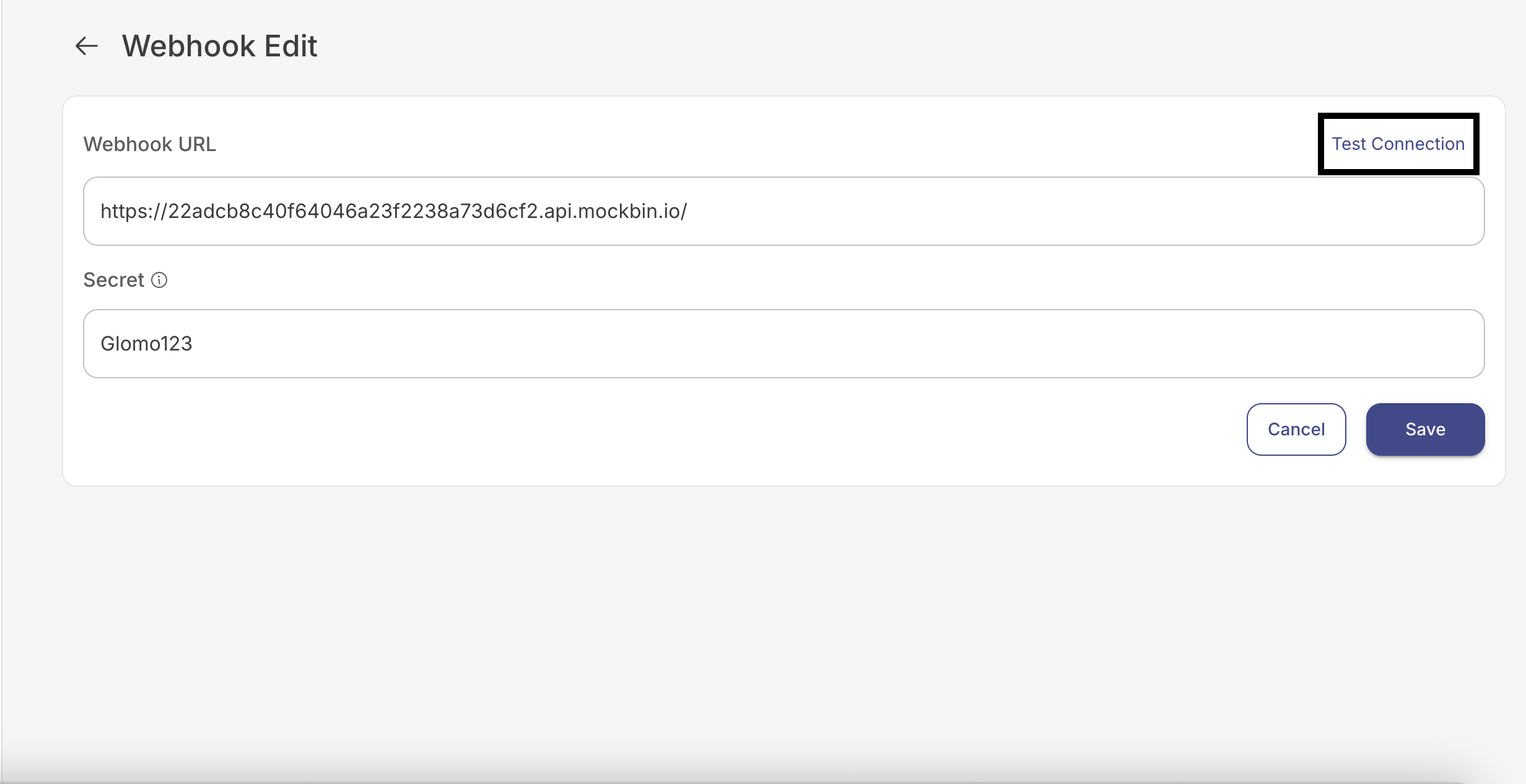
- Save your webhook details first — Enter your Webhook URL and Secret, then click Save. The Test Connection button is only available after the webhook details have been saved.
- Click "Test Connection" — The button is located in the top-right corner of the Webhook Edit page.
- Glomo will send a test request to your configured webhook URL.
| Result | Message |
|---|---|
| ✅ Success | Webhook connection successful |
| ❌ Failure | Request failed with status 422 |
If the test fails, verify that:
- Your webhook URL is publicly accessible over HTTPS
- Your server is returning a
200 OKresponse - There are no firewall or IP restrictions blocking Glomo's requests
Every webhook request Glomo sends is signed with your webhook secret key. This allows you to verify that the request genuinely came from Glomo and has not been tampered with in transit.
When Glomo sends a webhook, it:
- Builds the JSON event object.
- Serialises it using RFC 8785 JSON Canonicalization Scheme (JCS). This produces one deterministic byte sequence — the canonical form.
- Computes an HMAC SHA-256 over exactly those canonical bytes, using your webhook secret key, and hex-encodes the result.
- Sends those same canonical bytes as the HTTP request body, with the hex signature in the
X-Glomopay-Signatureheader.
The signed bytes and the transmitted bytes are the same bytes. The body you receive is already canonical, so you never have to canonicalize anything yourself — you HMAC the raw request body exactly as it arrived.
The header value is 64 lowercase hexadecimal characters with no algorithm prefix — X-Glomopay-Signature: d5b5… and not sha256=d5b5….
You do not need to implement JCS to verify a signature, but you do need to know what the bytes look like, because it explains why the body is not formatted the way the sample payloads in these docs are.
Under RFC 8785:
| Rule | What Glomo sends |
|---|---|
| Key order | Object keys are sorted lexicographically, recursively, at every nesting depth. data comes before entity_type before event_type. |
| Array order | Preserved exactly as generated. Sorting applies to object keys only, never to array elements. |
| Whitespace | None. No spaces after : or ,, no newlines, no indentation. |
| Encoding | UTF-8. Non-ASCII characters are sent literally (café, not caf\u00e9). |
| String escaping | Only the escapes JSON requires — \", \\, \b, \f, \n, \r, \t, and \u00XX for other control characters. Forward slashes are not escaped. |
| Numbers | ECMAScript Number::toString form — 250000, 1.5, 0, 0.000001, 1e+21. No trailing zeros; integers below 1e21 carry no decimal point and no exponent. |
On your server:
- Read the raw request body, as bytes, before any JSON parsing.
- Compute the HMAC SHA-256 of those bytes using your stored webhook secret key, and hex-encode it.
- Compare your value with the
X-Glomopay-Signatureheader using a constant-time comparison. - If they match, the webhook is authentic. If they don't, discard the request.
Do not re-serialise the body before hashing. Parsing the JSON and dumping it again —
json.dumps(json.loads(body)),JSON.stringify(req.body),payload.to_json— produces different bytes (different spacing, different escaping, and in most languages a different key order), and the signature will never match. Hash the bytes you received.
Most web frameworks parse the body for you and discard the original bytes. Keep a handle on the raw body:
| Framework | Raw body |
|---|---|
| Rails | request.raw_post |
| Django | request.body |
| Flask | request.get_data() |
| Express | express.raw({ type: 'application/json' }), or the verify callback on express.json() |
| PHP | file_get_contents('php://input') |
Important: Never process a webhook payload without first verifying the signature. Skipping this step exposes your system to spoofed or tampered requests.
Given the webhook secret whsec_2f1c9b7a4d6e8031, this is the exact request body Glomo puts on the wire — one line, 223 bytes, keys sorted at both levels:
{"data":{"amount":250000,"beneficiary":{"country":"DEU","name":"Acme GmbH"},"created_at":"2026-09-09T07:00:09Z","currency":"USD","id":"payout_6a8fd80eo6coZ","status":"success"},"entity_type":"payout","event_type":"success"}HMAC SHA-256 of those bytes with that secret is:
d5b5a68b9729f41c4a46f1e94c750bf10fb32f345a5467cbfec7739df83f2c02which is what arrives in X-Glomopay-Signature. Run your verification code against this pair before you point it at live traffic — if it reproduces that hex string, your raw-body handling is correct.
Code Examples
PHP
// $payload must be the raw body: file_get_contents('php://input')
function isValidSignature($payload, $headerSignature, $secretKey) {
    $computedHash = hash_hmac('sha256', $payload, $secretKey);
    return hash_equals($computedHash, $headerSignature);
}
Ruby
require 'openssl'

# payload must be the raw body: request.raw_post
def valid_signature?(payload, header_signature, secret_key)
  computed_hash = OpenSSL::HMAC.hexdigest('sha256', secret_key, payload)
  OpenSSL.secure_compare(computed_hash, header_signature.to_s)
end
Node.js
const crypto = require('crypto');

// payload must be the raw body Buffer, not the parsed object
function isValidSignature(payload, headerSignature, secretKey) {
    const computedHash = crypto.createHmac('sha256', secretKey).update(payload).digest('hex');
    const a = Buffer.from(computedHash, 'utf8');
    const b = Buffer.from(String(headerSignature), 'utf8');
    return a.length === b.length && crypto.timingSafeEqual(a, b);
}
Python
import hmac
import hashlib

# payload must be the raw body bytes: request.body / request.get_data()
def is_valid_signature(payload, header_signature, secret_key):
    computed_hash = hmac.new(secret_key.encode(), payload, hashlib.sha256).hexdigest()
    return hmac.compare_digest(computed_hash, header_signature)
Note: The Webhook delivery log in the dashboard stores the payload as parsed JSON and re-renders it for display, so the body shown there is not byte-identical to what was sent. Use it to inspect event contents, not to re-check a signature.
If Glomo sends a webhook to your URL and does not receive a 200 OK response — whether because your server is down, too slow, returned an error, or responded with any other status code — the delivery is considered failed.
Glomo will automatically retry the webhook delivery up to 9 times, using the following back-off schedule:
| Attempt | Delay After Previous Attempt |
|---|---|
| 1st retry | 1 minute |
| 2nd retry | 5 minutes |
| 3rd retry | 15 minutes |
| 4th retry | 1 hour |
| 5th retry | 3 hours |
| 6th retry | 6 hours |
| 7th retry | 12 hours |
| 8th retry | 24 hours |
| 9th retry | 48 hours |
If all 9 retries are exhausted without a successful 200 OK, no further delivery attempts will be made for that event.
- Return
200 OKimmediately — Acknowledge receipt first, then handle processing asynchronously in a background job or queue. - Monitor your endpoint — Set up alerting for 5xx errors or high response times on your webhook endpoint.
- Design for idempotency — Since retries can result in the same event being delivered multiple times, ensure your processing logic handles duplicate deliveries safely.
| Term | Definition |
|---|---|
| Webhook | An automated HTTP POST request sent by Glomo to your server when a specific event occurs. |
| Webhook URL | A publicly accessible HTTPS endpoint on your server configured to receive webhook POST requests from Glomo. |
| Payload | The JSON body of the webhook request, containing details about the event that occurred. |
entity_type | A field in every webhook payload that identifies the type of resource the event relates to (e.g., payment, payout, orders). |
event_type | A field in every webhook payload that identifies what happened to the resource (e.g., success, failed, active). |
| HMAC SHA-256 | A cryptographic algorithm used to sign webhook payloads. Glomo signs each request; you verify the signature to confirm authenticity. |
X-Glomopay-Signature | The HTTP request header that carries the HMAC SHA-256 signature of the webhook payload, as 64 lowercase hex characters with no algorithm prefix. |
| RFC 8785 | The JSON Canonicalization Scheme (JCS) — one deterministic serialisation of a JSON value, with object keys sorted at every depth and no insignificant whitespace. Glomo both signs and sends this form, so you verify against the raw body as received. |
| Idempotency | The property of an operation that produces the same result even if applied multiple times. Your webhook handler should be idempotent to handle potential duplicate deliveries safely. |
| Retry | An automatic re-delivery of a webhook that did not receive a 200 OK response. Glomo retries up to 9 times with increasing back-off intervals. |
| Back-off | The strategy of waiting progressively longer between retry attempts, reducing load on a struggling server while ensuring eventual delivery. |
| Secret Key | A shared secret you configure when setting up a webhook. Glomo uses it to sign payloads; you use it to verify the signature. |
| Polling | The alternative to webhooks — repeatedly querying an API to check for updates. Webhooks eliminate the need for polling by pushing updates proactively. |
| Smallest currency unit | The convention used for all monetary amounts in Glomo webhooks. Amounts are expressed without decimal points (e.g., $10.00 is sent as 1000). |